Pre-Cursor. Pre-Claude. First Wave AI.

TurboContent AI
SaaS Platform

A 9-tool AI creator dashboard — designed from scratch in December 2023, when there was no playbook for AI product UX and the only tool available was raw ChatGPT API.

AI First 0-to-1 Founder SaaS Dashboard ChatGPT API Era
TurboContent Dashboard Preview

The Situation & Early AI Context

This was December 2023 — before Claude Code, before Cursor, before Antigravity, before AI coding agents were a mainstream concept. Before every designer was suddenly claiming to "build with AI." ChatGPT had just gone mainstream as an API, Stable Diffusion was the cutting edge of image generation, and there was genuinely no standardized UX playbook for AI products.

I was brought on directly by the CEO of TurboContent AI as the founding UX lead to design and ship an MVP from zero. The mandate was ambitious: a single, unified web application that wrapped multiple AI capabilities — long-form article generation, image creation, code assistance, text paraphrasing, plagiarism checking, and persona-driven chat — into one coherent, polished product. No existing design system. No pattern library for AI UX. Just a blank canvas, a raw API, and a deadline.

PRODUCT TurboContent AI
TIMELINE Dec 2023 – Apr 2024
ROLE Lead Product Designer (0-to-1)
PLATFORM Web SaaS Application
AI STACK ChatGPT API, Stable Diffusion
TOOLS Figma, Design Systems
PROTOTYPE View Prototype →
FRICTION REDUCED 40% across 8+ tool modules
TOOL MODULES 9 complete AI tools shipped

The Tension — No Playbook Existed

The User Problem

Workflow Fragmentation at Scale

Content creators, marketers, and developers were running 4–5 different tabs simultaneously — ChatGPT for writing, MidJourney for images, a separate paraphraser, a code editor, and yet another grammar tool. Each with their own subscription, their own interface quirk, and their own login. Managing the data hand-offs between these silos was destroying creative flow and hemorrhaging time.

The Design Problem

The "Universal Text Box" Paradigm

In 2023, every AI product defaulted to a single chat box. But a marketing blog needs structured templates. An image generator needs parameter toggles and aspect ratio selectors. A code tool needs diff views and syntax highlighting. One monolithic input field was failing every professional use case simultaneously — treating every generative task as a casual conversation instead of a production workflow.

🔨

"The mission wasn't to build another chat clone wrapped around GPT. The mission was to design purpose-built UX shells around each AI pipeline — and then stitch them together into one coherent platform."

My Process & Architecture Decisions

With no established AI UX patterns to reference, every structural decision had to be invented, tested, and defended from first principles.

🧭
1

Sidebar-First Navigation

Rather than tabs or modals, I locked in a persistent collapsible left sidebar as the primary router across all 9 tools. Users could context-switch between Art, Writing, and Code without losing their place in any active generation.

🎛️
2

Structured Prompt Architecture

I eliminated the blank text box entirely. Instead, each tool uses structured parameter inputs — dropdowns, toggles, and chip selectors — that automatically construct optimal prompts behind the scenes. Zero prompt engineering required from the user.

3

Async State Design

AI generation is probabilistic and slow. I designed specific visual feedback loops for each output type: typewriter streaming for text, shimmer progress bars for image generation, and a minimizable "generating" modal to let users continue navigating the app while content was being produced.

🎭
4

Specialized Output Views

Different content types require radically different consumption modes. The Article Editor uses rich text formatting. The Code Assistant displays syntax-highlighted output with copy actions. The Art Generator uses a full-bleed gallery grid. One platform, four distinct output architectures.

The Platform — All 9 Tools

Nine purpose-built AI tools, one unified creator workspace. Each designed around the specific medium and workflow of its output.

01

Create Article — 7-Step Guided Wizard

The most sophisticated tool in the platform. Rather than asking users to "describe what you want," the Article Generator walks through a structured 7-step wizard: Keywords → Tone & Audience → AI-Generated Outline → Section Customization → Title → SEO Metadata → Final Review. Each step scaffolds the next, building a complete generation context before a single token is produced.

Step 3 is the standout moment: the AI generates a full outline with individual Confidence Scores (%) per section, shown as color-coded pills. Users can drag to reorder topics, add custom sections, or pin specific guidance for the AI to follow. The final review screen surfaces an overall Setup Confidence metric — a trust-building mechanism I designed specifically to combat the anxiety of hitting "Generate" and not knowing what you'd get.

02

My Documents & Smart Editor

Once articles are generated, they land in a structured document library showing status (Draft, Published, Generated), word counts, and timestamps. Clicking any document opens the Smart Editor — a dedicated rich-text editing workspace with a persistent right-side AI sidebar. The sidebar surfaces contextual AI actions: Summarize, Regenerate Section, Check Plagiarism, and Rewrite Tone — all applied directly to the current document without leaving the editor. This made post-generation refinement a first-class workflow rather than an afterthought.

03

100+ Blog Templates Library

A curated library of over 100 structured templates organized across five content channels: Blog, Ads, Social Media, Email, and Website. Templates eliminate the blank-page problem for users who know what format they need but don't know where to start. Each one pre-populates the article wizard with optimal structure, freeing users to focus purely on their subject matter and tone.
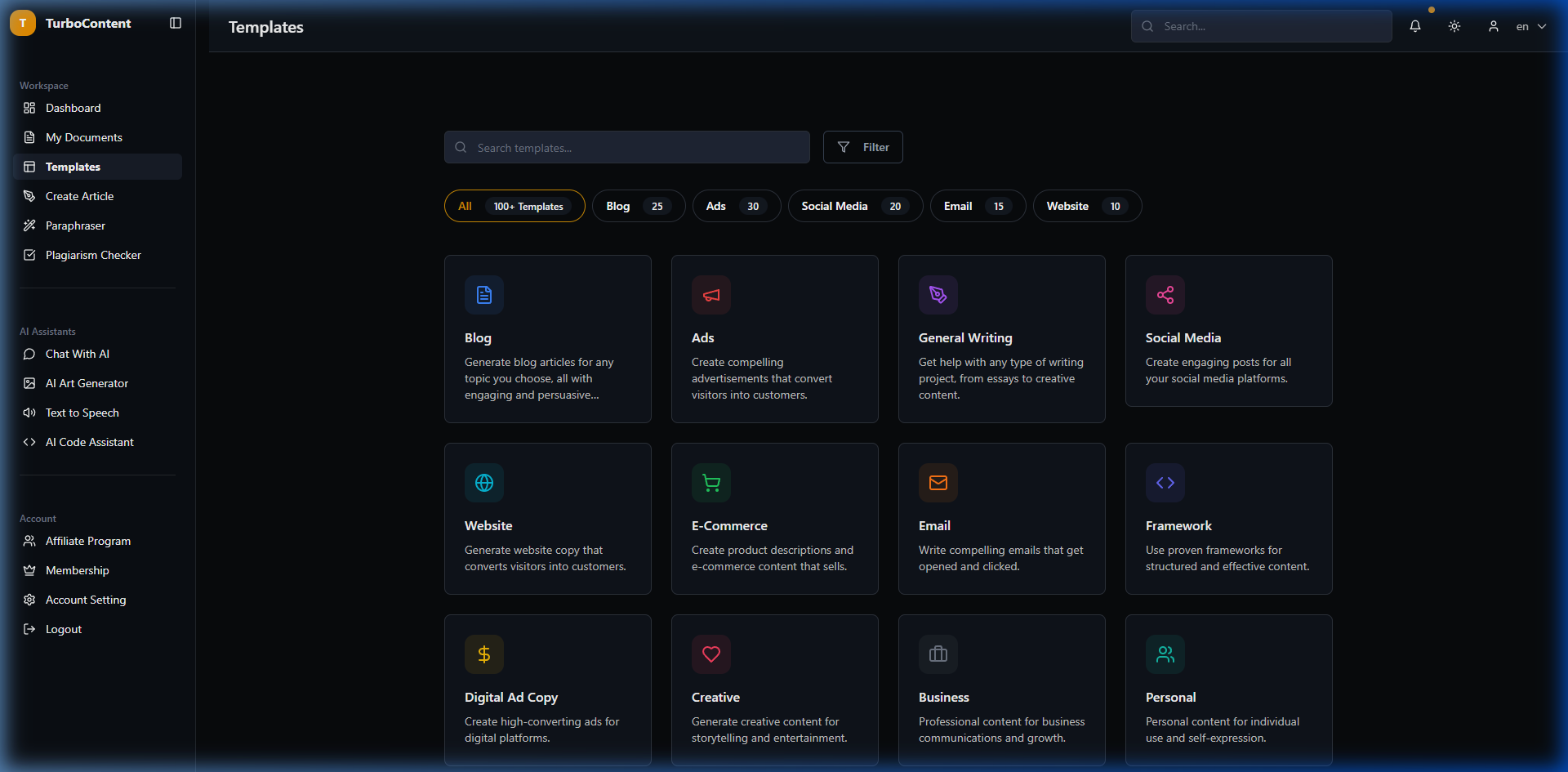
Blog Templates Library with category filters
04

AI Paraphraser

A dedicated two-panel interface for transforming existing content. The left panel accepts raw input text; the right panel renders the AI-rewritten output in real time. Users can select from multiple paraphrasing modes — Standard, Fluency, and Creative — making it useful for everything from deduplicating content to overhauling the voice of an existing draft. The split-view layout was a deliberate choice to make the before/after comparison immediate and visceral.

05

Plagiarism Checker

An integrated originality scanner that runs a full plagiarism analysis and returns a percentage-based originality report — surfacing matched sources and highlighted problem passages. I designed this as a trust-critical feature: content teams needed confidence that AI outputs were safe to publish. Having it embedded inside the same platform avoided the workflow break of copy-pasting into an external checker tool.

06

Chat With AI — Expert Personas

Instead of a generic chat interface, I mapped distinct AI personas to specialist roles: AiContentify Max (unlimited knowledge), John Doe (SEO Specialist), Elizabeth Claire (Relationship Coach), Charli Sandford (Cybersecurity), Matilda Fong (Business Consultant), and more. Each persona has a visual identity, a defined capability scope, and a tonal voice. The persona model was a deliberate UX decision to help users understand which AI to reach for — rather than one generic chat box that tried to do everything.

07

AI Art Generator

A professional-grade image generation interface built on Stable Diffusion. Controls include model selection, aspect ratio presets (1:1, 16:9, 9:16, 4:3), style modifiers (Dynamic, Realistic, Abstract), and a persistent generation history sidebar showing all previously created images. The history panel was a key decision — early AI art tools made it frustratingly difficult to find images you'd created 10 prompts ago. Persistent history meant the generator was actually usable as a production workflow tool, not just a demo.

08

Text to Speech

A multi-language voice synthesis tool with a character counter and audio file management table. Users write or paste content, select a voice profile (gender, accent, style), and generate downloadable audio files. The interface tracks the entire library of generated audio with metadata — language, duration, creation date — making it practical for content teams producing podcast intros, video narration, or accessibility-focused audio for their articles.

09

AI Code Assistant

A focused code generation tool built around a structured requirements form: give it a function title, describe the requirements in plain English, and it generates syntactically correct, ready-to-deploy code. Output is rendered with full syntax highlighting and copy/share actions. Worth noting: this was built in the GPT-4 API era — before GitHub Copilot was mainstream, before Cursor existed, and well before Claude Code changed everything. It represented a genuinely novel use case for the platform's target audience of non-developer creators who needed to add small scripts to their workflows.

The Result & Impact

40% Friction Reduced Across 8+ tool modules via structured UX and scaffolded flows
9 Tools Shipped Article, Art, Code, Chat, TTS, Templates, Paraphrase, Plagiarism, Documents
100+ Templates Blog, Ads, Social, Email & Website templates across 5 content channels
Dec '23 Shipped Before Cursor, Claude Code, or any AI coding agent was on the market

TurboContent AI launched as a fully functional generative platform that delivered on its central premise: eliminating the multi-tab fragmentation problem for content professionals. The platform felt like a single, coherent product — not a duct-taped suite of API calls — because every tool was designed around a specific workflow outcome rather than just surfacing raw model capability.

Operating as the sole designer meant zero safety nets: every IA decision, every interaction pattern for AI state management, every trust-building mechanism had to be invented and validated by me alone. It built a foundation in AI UX design that very few designers have had the opportunity to develop — and it happened in the window before the tooling and templates for AI product design even existed.

Final Reflection

If I were to rebuild this today, I'd lean much further into canvas-style embedded workflows — the way Notion, Claude Artifacts, or Figma's AI features now feel seamlessly part of the writing surface, not a separate generator you have to copy from. In 2023, the sidebar-router model was the right call given the constraints. Today, the interaction model has evolved.

This project fundamentally shaped how I think about AI product design. AI interfaces aren't just input/output systems — they're probabilistic, streaming, and require users to iterate rapidly in a "prompt → wait → refine → regenerate" loop. Designing for that loop at an architectural level, not just aesthetically, is the actual craft. I learned that earlier than almost anyone in my field — and that headstart has compounded significantly since.

Next Case Study

i2G SaaS Platform

Enterprise geoscience data visualization — redesigned and shipped as a live React MVP.

View Case Study →